
PM Kisan Yojana
The Pradhan Mantri Kisan Samman Nidhi Yojana (PM Kisan) is a key initiative by the Government of India to financially assist small and marginal farmers. Through this program, eligible farmers are provided ₹6,000 per year, disbursed in three equal installments of ₹2,000, directly credited to their bank accounts. However, to continue availing these benefits, completing e-KYC (Electronic Know Your Customer) is mandatory. The government has made e-KYC compulsory to ensure that only genuine farmers benefit from the scheme and to prevent fraud. In this blog, we’ll guide you through the e-KYC process for PM Kisan Yojana, its importance, and how to complete it easily.
Why is e-KYC Important?
e-KYC is a process to verify the identity of farmers registered under the PM Kisan scheme. It ensures that the benefits reach only eligible beneficiaries, eliminating misuse or fraudulent claims. Failure to complete e-KYC may result in your next installment being withheld. Hence, it’s crucial to complete this process as soon as possible to avoid disruptions in receiving funds.
What Do You Need for e-KYC?
To complete the e-KYC process, you’ll need the following:
- Aadhaar Number: Your 12-digit Aadhaar number registered with the PM Kisan scheme.
- Linked Mobile Number: A mobile number linked to your Aadhaar for receiving OTP (One-Time Password).
- Internet Access: Required for online e-KYC (optional if you visit a CSC center).
- Alternative: If your mobile number is not linked to Aadhaar, you can visit a Common Service Center (CSC) for biometric verification.
How to Complete e-KYC Online?
PM Kisan Yojana : You can complete the e-KYC process from the comfort of your home using the PM Kisan official website or mobile app. Follow these steps:
- Visit the Official Website: Open your browser and go to the PM Kisan official website pmkisan.gov.in.
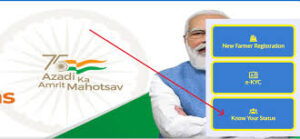
- Select e-KYC Option: On the homepage, under the “Farmers Corner” section, click on the “e-KYC” option.
- Enter Aadhaar Number: A new page will open where you need to enter your 12-digit Aadhaar number. Click “Search.”
- OTP Verification: If your mobile number is linked to Aadhaar, you’ll receive an OTP on your registered mobile number. Enter the OTP in the provided box and click “Submit.”
- Confirmation: Upon successful OTP verification, your e-KYC process will be complete, and you’ll see a confirmation message on the screen.
Note: If you encounter an “Invalid OTP” error, ensure you’re using the mobile number registered with your PM Kisan account.
How to Complete e-KYC Offline?
If your mobile number is not linked to Aadhaar or you’re not comfortable with the online process, you can visit a nearby Common Service Center (CSC). Here’s how:
- Visit your nearest CSC with your Aadhaar card and PM Kisan registration number.
- Inform the CSC operator that you need to complete e-KYC for the PM Kisan scheme.
- Your identity will be verified through biometric authentication (fingerprint or face scan).
- Once verified, you’ll receive confirmation of successful e-KYC completion.
e-KYC via Face Authentication
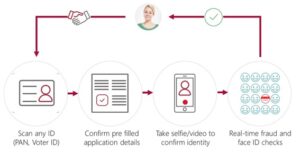
The PM Kisan Yojana now supports face authentication for e-KYC, making the process even more accessible. To use this:
- Download the PM Kisan mobile app from the Google Play Store.
- Open the app and select the “Face Authentication” option.
- Scan your face using your phone’s camera as prompted.
- Once verified, your e-KYC will be updated successfully.
Key Tips for a Smooth e-KYC Process
- Link Mobile Number: If your mobile number is not linked to Aadhaar, visit a CSC or Aadhaar Seva Kendra to update it before starting the e-KYC process.
- Website Traffic: The PM Kisan website may experience high traffic, causing delays. Try again after some time if the site is slow.
- Helpline Support: For any issues, contact the PM Kisan helpline at 155261 or 011-24300606.
- Regular Checks: Periodically check your e-KYC status and beneficiary details on pmkisan.gov.in to stay updated.
Also Read This: Doha Diamond League 2025 : A Global Showcase of Track and Field
PM Kisan Yojana
PM Kisan Yojana : The PM Kisan Samman Nidhi Yojana is a lifeline for millions of farmers across India, and completing e-KYC is a critical step to ensure uninterrupted access to its benefits. By verifying your identity, e-KYC helps maintain the scheme’s integrity and ensures that funds reach genuine farmers. Whether you choose the online method, visit a CSC, or use face authentication, complete your e-KYC at the earliest to secure your next installment. Don’t delay—start the process today!