
Apple Pay has transformed how millions of people pay for everyday purchases. Instead of digging for a physical card or typing long card numbers online, you can complete transactions with a simple tap or glance on your iPhone, Apple Watch, iPad, or Mac. This guide explains what Apple Pay is, how it works, its key benefits, setup steps, and why it ranks among the most secure payment methods available today.
What Is Apple Pay?
Apple Pay is Apple’s built-in mobile payment and digital wallet service. It stores your eligible credit, debit, or prepaid cards in the Wallet app and lets you make contactless payments in stores, within apps, and on the web. It works wherever you see the contactless payment symbol or the Apple Pay mark.
Unlike traditional cards, Apple Pay never shares your actual card number with merchants. When you add a card, your bank creates a unique Device Account Number (a token) that is stored securely on your device. Each transaction uses this token plus a one-time dynamic security code.
How Does Apple Pay Work?
The process is simple on the surface but relies on strong security underneath:
- You double-click the side button (or Home button on older models) to open Wallet.
- Authenticate with Face ID, Touch ID, Optic ID, or your device passcode.
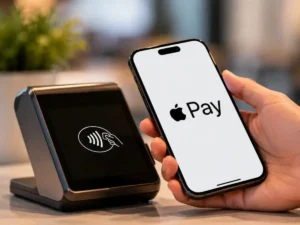
- Hold your iPhone or Apple Watch near a contactless terminal (or confirm in an app or on the web).
- Near Field Communication (NFC) transmits the tokenized credentials.
- The payment is approved, and you see a confirmation on screen.
In apps and on websites that support Apple Pay, you simply tap the Apple Pay button and authenticate. No need to fill out lengthy forms.
Key Benefits of Using Apple Pay
- Speed and Convenience: Pay in seconds without opening your wallet or entering details.
- Enhanced Security: Your real card number is never stored on the device or shared with merchants. Data lives in the Secure Element, a dedicated chip isolated from the operating system.
- Privacy Protection: Apple does not keep transaction information that can be tied back to you. Transactions stay between you, the merchant, and your bank.
- Rewards and Benefits: You still earn the same rewards, cash back, and protections offered by your card issuer.
- Wide Acceptance: Available at millions of locations worldwide, in apps, and on websites. Support continues to expand (recently including new markets such as India with participating banks).
- Device Integration: Works seamlessly across iPhone, Apple Watch, iPad, Mac, and Apple Vision Pro.
How to Set Up Apple Pay
Setting up Apple Pay takes only a couple of minutes:
- Open the Wallet app on your iPhone.
- Tap the + button.
- Choose Debit or Credit Card.
- Scan your card with the camera or enter the details manually.
- Follow the verification steps from your bank (usually a code via text or app).
Once added, the card appears in Wallet and is ready to use. You can also add cards directly from many banking apps. Compatible devices include recent iPhones with NFC, Apple Watch models, iPads with Face ID or Touch ID, and Macs with Touch ID or paired authentication.
Is Apple Pay Safe?
Yes. Apple Pay is designed to be more secure than using a physical card. Key protections include:
- Tokenization so merchants never receive your real card number.
- Biometric or passcode authentication required for every payment.
- Secure Element hardware storage that is not backed up to iCloud.
- No retention by Apple of personally identifiable transaction data.
Even if a merchant experiences a data breach, your actual card details are not exposed because they were never transmitted.
Tips for Getting the Most Out of Apple Pay
- Set a default card in Wallet for one-tap payments.
- Use Apple Watch for quick transit or store payments when your phone is in a bag.
- Check participating banks and card issuers in your country, as availability varies by region and issuer.
- Keep your device software updated for the latest features and security improvements.
- Combine it with contactless rewards cards stored in Wallet where supported.
Also Read This : iPhone Ultra Fold : Apple’s First Foldable iPhone – Rumored Features, Design, Specs, and Price
Apple Pay delivers a cleaner, faster, and more private way to pay whether you’re in a store, buying in an app, or checking out online. By replacing physical cards with secure tokens and requiring biometric confirmation, it reduces friction while raising the security bar. If you own a compatible Apple device and a supported card, adding Apple Pay takes minutes and can streamline nearly every purchase you make.
View this post on Instagram